mirror of
https://github.com/rustdesk/rustdesk-server.git
synced 2026-03-09 21:43:14 +08:00

48 lines
1.3 KiB
Markdown
48 lines
1.3 KiB
Markdown
|
|
# Set up your own cloud by following those simple steps:
|
|
-----------
|
|
|
|
## STEP-1 : Download server-side software programs
|
|
|
|
Check this link below for download programs.
|
|
|
|
[Download](https://github.com/rustdesk/rustdesk-server/)
|
|
|
|
There are two executables:
|
|
- hbbs - RustDesk ID/Rendezvous server
|
|
- hbbr - RustDesk relay server
|
|
|
|
They are built on Centos7, tested on Centos7/8, Ubuntu 18/20, can also run on Synology if you have access to terminal.
|
|
|
|
### STEP-2 : Run hbbs and hbbr on server
|
|
|
|
Run hbbs/hbbr on your server (Centos or Ubuntu). We suggust you use [pm2](https://pm2.keymetrics.io/) managing your service.
|
|
|
|
By default, hbbs listens on 21115(tcp) and 21116(tcp/udp), hbbr listens on 21117(tcp).
|
|
|
|
Please run with "-h" option to see help if you wanna choose your own port.
|
|
|
|
### STEP-3 : Set hbbs/hbbr address on client-side
|
|
|
|
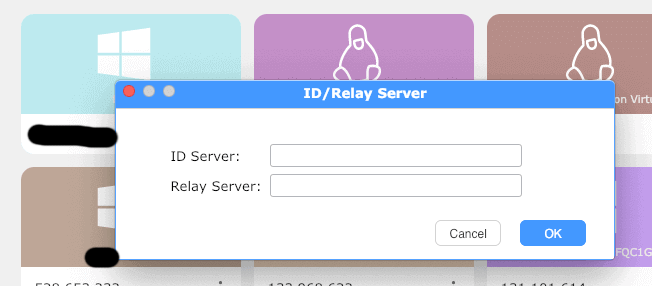
Click on menu button on the right side of ID as below, choose "ID/Relay Server".
|
|
|
|

|
|
|
|
Please input hbbs host or ip address in ID server input box, and hbbr host or ip address in relay server input box.
|
|
|
|
e.g.
|
|
|
|
```
|
|
hbbs.yourhost.com
|
|
hbbr.yourhost.com
|
|
```
|
|
|
|
or
|
|
|
|
```
|
|
hbbs.yourhost.com:21116
|
|
hbbr.yourhost.com:21117
|
|
```
|
|
|
|
|